You paste a signal into MT5, hit Buy or Sell, and get an error like “order not filled”, “requote”, or the trade simply doesn’t open when it matters. Often the problem isn’t your internet or the signal itself—it’s your MT5 fill policy for signals and how it interacts with your broker’s execution model and available liquidity.
Fill policy sounds technical, but it’s a practical setting: it tells MT5 what to do if your requested volume can’t be filled exactly as requested at that moment. If you set it wrong, you can turn normal market conditions (spread widening, thin liquidity, fast moves) into missed entries.
Key takeaways
- Fill policy controls whether MT5 allows partial fills or requires the entire order to be filled immediately.
- FOK (Fill or Kill) is strict: all volume now or the order is rejected—common cause of “order not filled”.
- IOC (Immediate or Cancel) fills what it can now and cancels the rest—useful when partial fills are acceptable.
- Return allows partial fills and leaves the remainder working (depending on broker/support)—often the most forgiving for larger sizes.
- The “best” setting depends on your broker’s execution model, your trade size, and whether you can tolerate partial fills when following signals.
What “Fill Policy” means in MT5 (in plain English)
When you send an order, MT5 must match your requested volume (lot size) with available liquidity at the broker. In calm markets, that’s usually instant. In fast markets (news, session opens, gold spikes), the broker may not be able to fill your full volume at once at the price stream you’re receiving.
Fill policy is MT5’s instruction for what to do in that moment:
- Reject the order if the full volume can’t be filled immediately (FOK).
- Fill as much as possible now, cancel any remainder (IOC).
- Fill what’s available now and keep the rest pending to fill when possible (Return).
This is not the same as slippage settings. Slippage is about price tolerance. Fill policy is about volume completion.
Why fill policy matters when you follow signals
Most signal followers care about three things:
- Getting into the trade quickly (especially market entries).
- Getting in with the intended risk (correct lot size and stop loss).
- Avoiding execution errors that cause missed trades or unexpected fills.
Fill policy affects all three. A strict policy can cause missed entries. A permissive policy can cause partial entries that change your risk if you don’t notice.
FOK vs IOC vs Return in MT5 (what each one actually does)
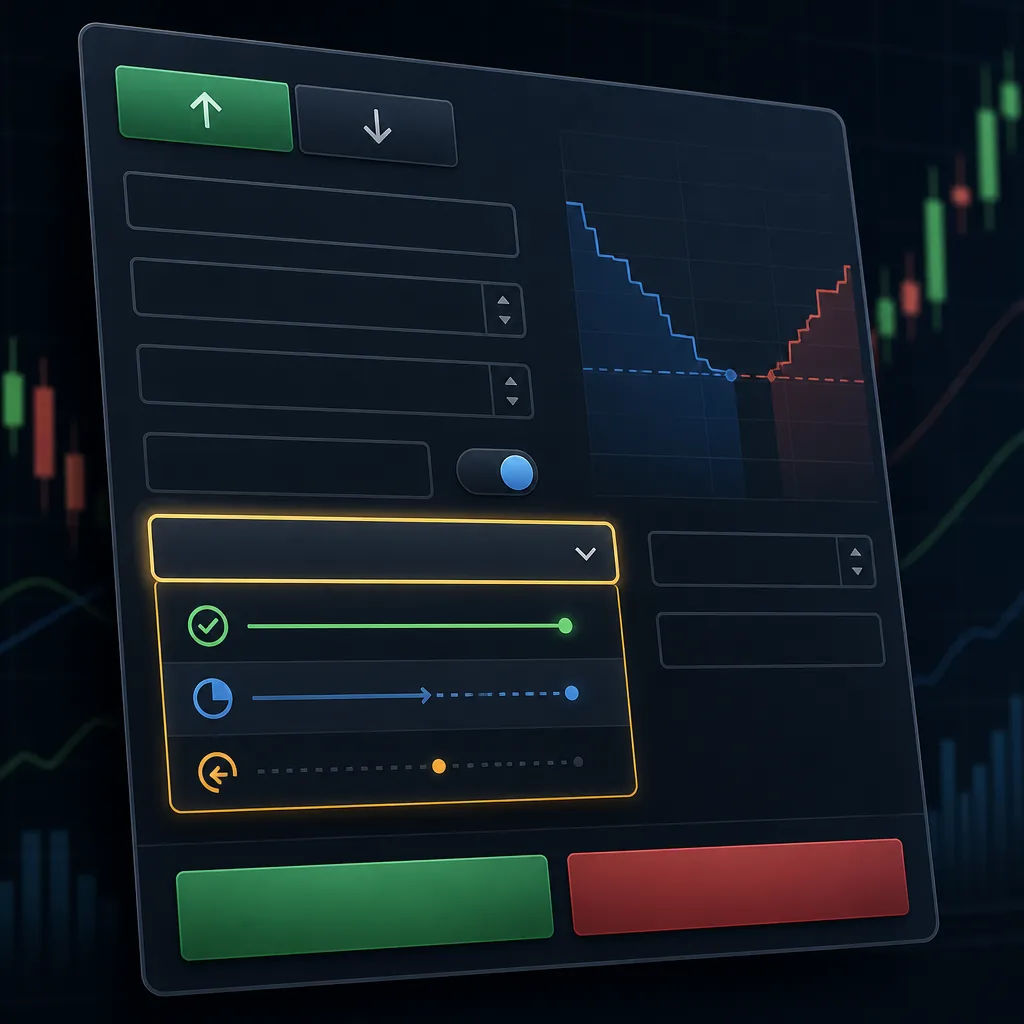
Here’s the practical difference, using a simple liquidity example.
Hypothetical example: You try to buy 1.00 lot of XAUUSD at market. At that moment, the broker can immediately fill only 0.60 lot at the current stream (the remaining 0.40 lot is not available instantly at that exact moment/price level).
| Fill policy | What MT5 requests | What happens if only part is available | Most common trader outcome |
|---|---|---|---|
| FOK (Fill or Kill) | Fill all volume immediately or reject | Order is rejected (no partial fill allowed) | “Order not filled” / missed entry |
| IOC (Immediate or Cancel) | Fill what you can immediately, cancel the rest | 0.60 lot is filled, 0.40 lot is canceled | You are in the trade, but with smaller size than planned |
| Return | Allow partial fill; remainder may stay to be filled | 0.60 lot fills now; 0.40 lot remains working (if supported) | You may end up with full size, but filled in pieces |
What each fill policy is “good for” (and what it breaks)
FOK is good when you only want the trade if you can get the full planned size instantly. It’s strict and clean. But for retail traders following signals, it’s also the most common reason for unnecessary rejections during volatility or when trading larger lots.
IOC is good when you prefer some fill rather than none. The trade opens (often) even in fast markets. The downside is that your position size may be smaller than your risk plan, which can throw off your expected outcome and your ability to manage the trade exactly like the signal.
Return is good when you’re okay with the broker filling you in parts. It’s often the most forgiving for execution, but it can create complexity: you might get multiple fills at slightly different prices, and your average entry becomes the meaningful number.
Where you see Fill Policy in MT5 (and why it’s sometimes greyed out)
In MT5, fill policy is usually visible in the New Order window, but what you can choose depends on:
- Your broker’s settings for that symbol (EURUSD, XAUUSD, etc.).
- The execution type (Market Execution vs Exchange vs Instant Execution—brokers differ).
- The order type (Market order vs pending order). Fill policy is primarily relevant to market/exchange execution.
If the fill policy dropdown is greyed out or you only see one option, it usually means the broker enforces a specific fill mode for that symbol. In that case, your “fix” is not to force a different policy—it’s to adjust how you execute signals (for example, using limit orders where appropriate, reducing size, or avoiding peak volatility windows).
Quick navigation (typical MT5 paths)
- Desktop MT5: Right-click symbol in Market Watch → New Order → look for Fill policy.
- Symbol properties: Right-click symbol → Specification → look for execution details and allowed filling modes (wording varies by broker).
Even if you can’t change fill policy, understanding it explains why you’re seeing “order not filled” at specific times.
Common “missed trade” scenarios caused by the wrong fill policy
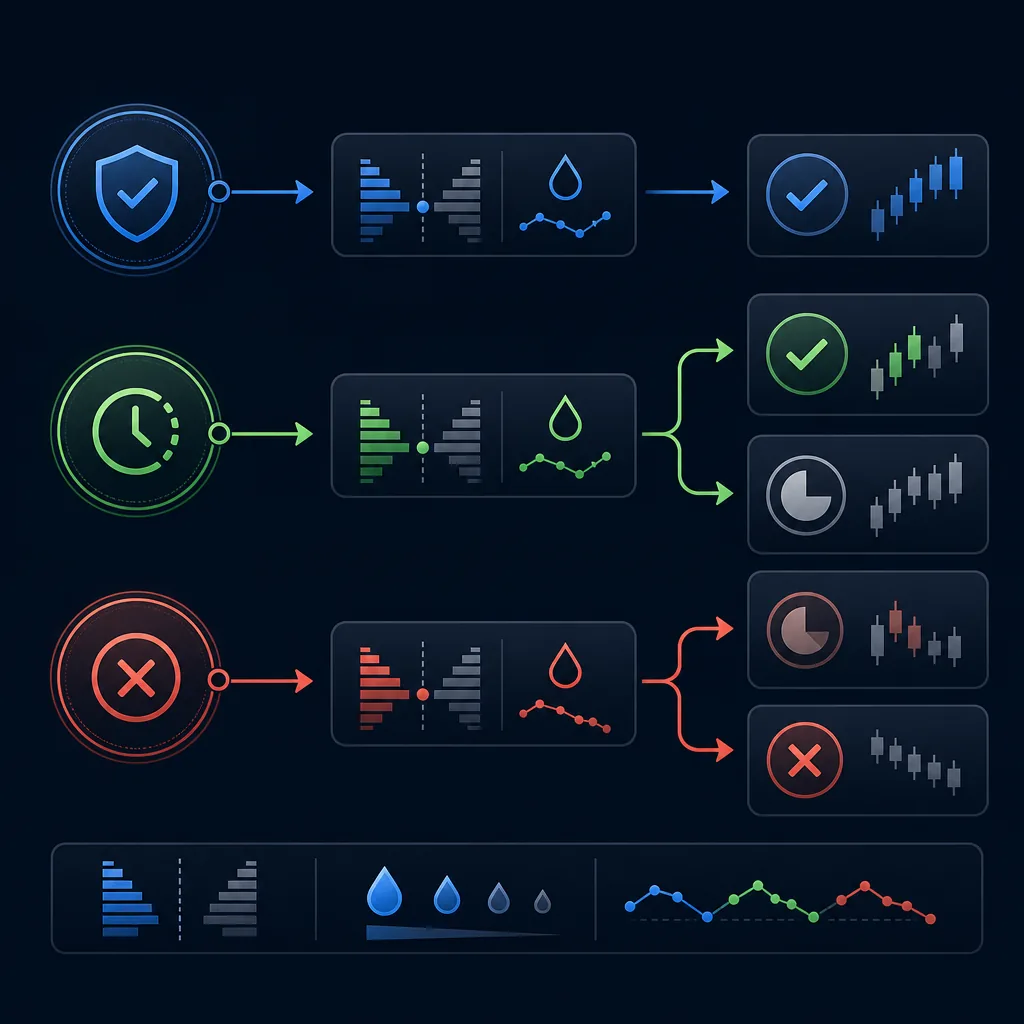
Let’s tie the setting to the real issues signal followers report.
Scenario 1: You use FOK on gold during fast moves
Gold (XAUUSD) can move quickly, and liquidity can thin out around news releases and session transitions. If you use FOK, MT5 demands the entire lot size instantly. If the broker can’t fill it as one complete deal, the order is rejected.
Hypothetical example: A signal says “Buy XAUUSD now, SL 15.0 away.” You calculate a larger lot size than usual because your account is bigger. Price jumps, spread widens briefly, and liquidity is patchy. With FOK, you get “order not filled” and miss the entry entirely.
What to consider: If you consistently see rejections only during volatility, FOK is often too strict for your trade size and the symbol’s typical conditions.
Scenario 2: You use IOC and don’t notice partial fills
With IOC, MT5 may fill only part of your intended volume. That can be fine—unless you manage the trade assuming you have the full lot size.
Hypothetical example: You intended to sell 1.00 lot EURUSD with a 20-pip stop, risking $200 (example numbers). IOC fills 0.70 lot and cancels 0.30. You think you’re risking $200, but you’re actually risking $140. That changes your plan: your take-profit value, your hedge decisions, and even whether a partial close makes sense.
What to consider: If you use IOC, build the habit of checking the actual filled volume immediately after execution.
Scenario 3: You use Return and get multiple fills (average price confusion)
Return can fill you in pieces, sometimes at slightly different prices. MT5 will show an average entry for the net position, but the execution log may show multiple deals.
Hypothetical example: You buy 1.00 lot XAUUSD. You get 0.40 filled, then 0.30, then 0.30. If you’re comparing your entry to a Telegram signal line-by-line, it can look “wrong,” even though the average entry is reasonable for the market conditions.
What to consider: When using Return, compare your average price and your risk (distance to SL × lots), not a single print.
Broker execution models: how they relate to fill policy
Retail traders often describe brokers as “market maker” or “ECN,” but in practice you’ll see a mix of execution behaviors. The important point is: some brokers prefer complete fills, some allow partial fills, and some enforce a specific mode per symbol.
Instead of guessing, you can infer what your broker is doing by observing your trade logs:
- Do you ever see partial fills or multiple deals for one order? (IOC/Return behavior)
- Do you frequently see requotes or “order not filled” during volatility? (often strict fill behavior or price tolerance issues)
- Do certain symbols behave differently (e.g., XAUUSD vs EURUSD)? (symbol-specific execution settings)
A quick matching checklist (fill policy vs typical retail conditions)
Use this as a starting point. Your broker may still restrict what’s available.
| Your situation | What usually goes wrong | Fill policy to try first | Why |
|---|---|---|---|
| Trading XAUUSD signals during high volatility | “Order not filled” on market entries | IOC or Return | More tolerant when full size isn’t instantly available |
| Small lot sizes on major FX pairs | Rare issues; occasional slippage | FOK (if stable) or broker default | Liquidity is usually deep enough for full fills |
| Large lot sizes relative to your broker’s liquidity | Rejections or partial fills | Return | Allows the order to complete in pieces (if supported) |
| You must match the signal’s risk precisely | Partial fill changes risk | FOK (or smaller size) | Either you get full planned size or you don’t trade |
| You prefer “some exposure” rather than missing trades | Missed entries due to strict rules | IOC | Gets you in quickly even if size is reduced |
Step-by-step: Set MT5 to execute signals with the right fill policy
This process is designed for signal followers who want fewer execution errors without accidentally changing their risk.
Step 1: Identify what kind of signal entry you’re placing
- Market entry (“Buy now / Sell now”): fill policy matters most.
- Pending entry (Buy Limit/Sell Limit/Stop): fill policy is less central; price triggering rules matter more, but broker execution still applies at trigger time.
If your signals are mostly market entries, spend more time here. If they’re mostly limits, focus on correct order type and price placement (and see our forex risk management resources to keep risk consistent even when entries vary).
Step 2: Check what your broker allows for that symbol
In MT5 desktop:
- Right-click the symbol in Market Watch → Specification.
- Look for wording like Filling mode, Execution, and any notes about partial fills.
If the broker only allows one mode, you can’t override it. Your best lever becomes trade size and timing (avoid the worst liquidity moments).
Step 3: Choose the fill policy based on your priority
Decide what you care about most when copying signals:
- Priority A: Don’t miss entries. Try IOC first.
- Priority B: Match exact position size/risk. Use FOK (or reduce lot size so fills are more reliable).
- Priority C: Get full size even if it takes multiple fills. Try Return (if available).
There isn’t a universal best choice. The right answer is the one that produces the fewest execution problems without breaking your risk plan.
Step 4: Place a controlled test trade (demo first)
Before you apply a new fill policy on a live account, test it on a demo account in conditions similar to when you normally trade.
- Test during a calm period (mid-session).
- Test during a faster period (session open) with a small demo size.
Record what happens: full fill, partial fill, rejection, multiple deals, and average price. This is the quickest way to see how your broker behaves.
Step 5: After execution, verify three things (the “3-number check”)
Every time you execute a signal—especially with IOC or Return—check:
- Filled volume (did you get the lot size you intended?).
- Average entry price (especially if multiple fills occurred).
- Stop loss distance (is SL placed correctly and at the intended distance?).
If any of these are off, fix them immediately. A correct fill policy reduces errors, but it doesn’t eliminate the need to verify the trade.
Practical guidance: which fill policy reduces “order not filled” the most?
If your main complaint is “order not filled” when you hit market buy/sell, the most common cause is FOK being too strict for the moment you’re trading.
In many retail setups:
- IOC tends to reduce outright rejections because it accepts partial volume.
- Return can also reduce rejections and may complete the full size over multiple fills (if your broker supports it).
But there’s a trade-off: fewer rejections can mean more partial fills. That’s why the “3-number check” matters.
When FOK is still the right choice
FOK can be the right choice if:
- You trade small sizes where full fills are almost always available.
- You must match a signal’s position size precisely (for example, you track results trade-by-trade and don’t want partial exposure).
- You prefer to skip trades rather than get a different exposure than planned.
If you choose FOK, the best way to reduce rejections is often to reduce lot size or avoid the worst volatility windows (for gold, that can include major macro releases; see timing guidance like best time to trade xauusd).
How fill policy interacts with slippage, spreads, and requotes
Traders often mix these up, so here’s a clean separation:
- Spread widening changes your effective entry price and can trigger stops sooner. Fill policy doesn’t prevent widening.
- Slippage is getting filled at a worse (or better) price than expected. Fill policy doesn’t set slippage tolerance; it decides what to do if volume can’t be filled as requested.
- Requotes are more associated with certain execution types. If you see requotes, you may be dealing with an execution model where the broker is re-offering a price. Fill policy alone may not solve it.
So if your issue is “I got filled but at a different price,” that’s not primarily a fill policy problem. If your issue is “I didn’t get filled at all,” fill policy is one of the first settings to check.
Signal-following examples (hypothetical) using each fill policy
These are not forecasts—just method examples to show how outcomes differ.
Example A: FOK (strict) on a market entry
Hypothetical example: A signal says: “Buy XAUUSD now, SL 15.0 away, TP 30.0 away.” You decide to risk $150. Your lot size calculation gives 1.00 lot (example). You place a market buy with FOK.
- If 1.00 lot is available instantly: you’re filled, clean execution.
- If only 0.70 lot is available instantly: the order is rejected, you miss the trade.
Best for: traders who prefer no trade over a different size.
Example B: IOC (practical) when you don’t want to miss the move
Hypothetical example: Same signal, same planned 1.00 lot. You use IOC.
- 0.70 lot fills immediately.
- 0.30 lot is canceled.
You’re in the trade, but your risk is lower than planned unless you manually adjust. If you want to restore planned risk, you may consider adding the missing volume—but only if spreads and volatility have normalized. Otherwise you can end up chasing.
Best for: traders who value participation and can manage size differences calmly.
Example C: Return (flexible) for completing size over time
Hypothetical example: Same signal, same 1.00 lot, using Return.
- 0.50 lot fills now.
- 0.30 lot fills a moment later.
- 0.20 lot fills slightly later (or remains unfilled, depending on broker).
Your average entry price matters more than any single fill. Your stop loss should be placed based on the plan, and your risk should be checked against the final filled volume.
Best for: traders using larger sizes or symbols prone to momentary liquidity gaps.
Quick checklist: reduce “order not filled” issues when following signals
- Check broker symbol specification to see which filling modes are allowed.
- If you often get rejections on market entries, avoid FOK as a first test; try IOC or Return (if available).
- If you choose IOC/Return, commit to the 3-number check: filled volume, average entry, SL distance.
- Reduce lot size if you’re trading a size that frequently triggers partial fills or rejections.
- Avoid executing at the worst moments (rollover, major news seconds, session open spikes). For gold timing, see best time to trade xauusd.
- Practice the workflow on demo until you can execute and verify in under a minute.
Common mistakes traders make with MT5 fill policy
Mistake 1: Thinking FOK is “faster” or “better execution”
FOK doesn’t make the broker fill you faster. It just increases the chance your order is rejected when full volume can’t be matched immediately.
Mistake 2: Using IOC and assuming you got full size
This is a big one for signal followers. If you don’t notice a partial fill, you’ll manage the position incorrectly. Make the volume check a habit.
Mistake 3: Blaming fill policy for price differences
If you were filled but your entry price differs from the signal, your main suspects are spread, slippage, and execution timing—not fill policy. Fill policy is about whether and how completely you get filled.
Mistake 4: Changing fill settings without changing your process
If you switch from FOK to IOC/Return, you must also switch to a process that verifies volume and average price. Otherwise you’re trading “blind” during the exact moments you’re trying to fix.
FAQ
Which fill policy is best in MT5 for copying Telegram signals?
It depends on your priority. If you want fewer “order not filled” errors on market entries, IOC (or Return if available) is often more forgiving. If you must match exact size or you prefer to skip trades rather than accept partial fills, FOK can be better—especially with smaller lot sizes.
Why is the fill policy option missing or greyed out in MT5?
Your broker may enforce a specific filling mode for that symbol or execution type. Check the symbol’s Specification. If only one mode is allowed, you can’t force another one from MT5.
Does “Return” mean my order will always fully fill eventually?
No. Return allows partial fills and may leave the remainder working, but completion depends on broker rules, liquidity, and market conditions. Sometimes the remainder won’t fill, or it may fill at different prices.
Can fill policy cause requotes?
Fill policy is mainly about partial vs complete fills. Requotes are more tied to the broker’s execution method and price stream behavior. Changing fill policy may change rejection/partial-fill behavior, but it won’t “fix” a broker that frequently requotes.
If I get partial fills, does that change my risk?
Yes. Your risk is a function of filled volume × stop distance. If you planned 1.00 lot but only 0.70 filled, your risk is lower—unless you add size manually. Always verify filled volume and SL placement after entry.
Risk warning: Trading forex and gold (XAUUSD) involves a significant risk of loss and is not suitable for every trader. Execution settings can reduce certain errors, but they cannot remove market risk, slippage, or volatility. Past performance does not guarantee future results. This article is for education only and is not personal financial advice. If you’re new, practise on a demo account before trading live.
If you want trade ideas delivered with clear levels, United Kings sends forex and gold (XAUUSD) signals on Telegram with an entry, stop loss, and take-profit levels. You can view a selection in our free public telegram channel. If you’re comparing services, see our best forex signals guide, and for transparency on how results are tracked, review our results and methodology. VIP plan details are on our pricing page.